Why Your RAG System Will Break at Scale — And the Architecture That Prevents It
Most RAG systems work fine in demos. Under real concurrent load they collapse — latency spikes, LLM bills explode, users abandon. The fix isn't a better model. It's separating the two pipelines that should never share infrastructure.
The pattern repeats on nearly every enterprise RAG engagement we take on: a team builds a knowledge assistant, it works beautifully in staging, the demo impresses stakeholders, it goes live. Three weeks later the support channel has complaints about slowness, the CFO is asking why the OpenAI bill tripled, and someone is quietly planning a re-architecture.
The problem isn't the model they chose. It isn't the vector database. It's that they built one pipeline and expected it to do two fundamentally different jobs at the same time.
The two jobs that break each other
A production RAG system does two things:
- ▸
Ingestion — taking documents, chunking them, generating embeddings, and writing them to a vector store. This is CPU and GPU intensive, often slow (a 500-page PDF might take 30 seconds to process), and not time-sensitive.
- ▸
Query — receiving a user question, embedding it, searching the vector store, passing retrieved context to an LLM, and returning an answer. This must complete in under 2 seconds for users to find it acceptable.
When these run on the same infrastructure, one user uploading a large document creates a GPU saturation event that every other user feels simultaneously. Latency spikes from 400ms to 4 seconds. If you're paying per token and the system is doing embedding-heavy ingestion in the background, your inference costs spike disproportionately too.
This is not a model problem. It's an architecture problem.
The fix: two pipelines, scaled independently
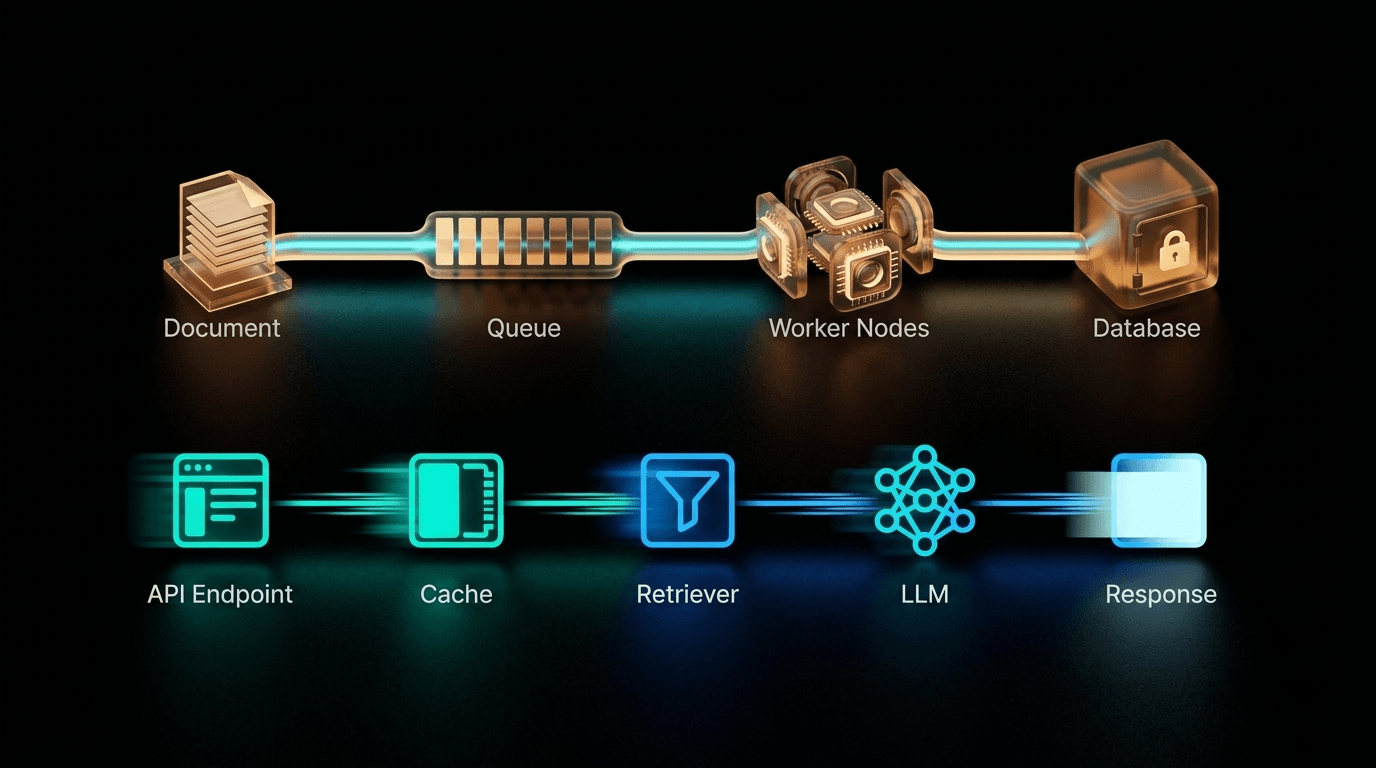
The architecture that survives real production traffic separates ingestion from query completely — different compute, different scaling rules, different failure modes.
The ingestion pipeline: async and invisible to users
Document upload triggers a job onto a message queue. Workers pull from the queue in the background. The user gets an immediate acknowledgment and the system processes asynchronously.
The key components:
Message queue (Celery + Redis or Kafka): Absorbs upload bursts. Ten users uploading 20MB PDFs simultaneously don't compete for GPU resources — they queue. Each document processes when a worker is available.
Background workers: Handle the compute-intensive work: PDF parsing, text extraction, chunking, embedding generation. These can be scaled up during off-peak hours and scaled down during peak query time.
Content-addressed storage for embeddings: Before generating an embedding, hash the text content + model ID. If that hash already exists in your store, skip re-embedding. When you upgrade your embedding model and need to re-index, only changed content requires new compute. On a 50,000-document corpus, this can cut re-indexing cost by 60–80%.
The query pipeline: the path that must never slow down
Every user request hits this path. Latency here is your product's perceived quality. The sequence that works under concurrency:
</>View technical implementation · عرض التفاصيل التقنية
API Gateway → Semantic Cache → Query Rewriter → Hybrid Retriever → Reranker → LLM
Each step has a specific role, and skipping any of them shows up in your metrics.
The component that pays for itself fastest: semantic caching
Of all the optimizations in a production RAG system, semantic caching has the highest ROI relative to implementation effort. Here's why it matters in financial terms.
In a typical enterprise knowledge base deployment, the majority of queries are variations on a small set of recurring questions. "What is our refund policy?" comes in 50 different phrasings. "What are the visa requirements for [country]?" is asked by different users who all get identical answers.
A semantic cache works at two levels:
- ▸Exact match in Redis: If the same query string has been seen before, return the cached response instantly. Zero LLM cost.
- ▸Semantic similarity: If a new query is semantically close to a cached query (cosine similarity above a threshold, typically 0.92–0.95), return the cached response. One enterprise team we've seen documented 50% reduction in LLM API costs from this single layer.
The tradeoff is freshness — cached responses need to be invalidated when source documents change. For knowledge bases with weekly or monthly update cycles, this is trivially managed. For real-time data feeds, reduce or eliminate the cache TTL.
Why vLLM isn't optional at real concurrency
Once you have more than 10–15 concurrent users, the way you serve the LLM matters as much as which LLM you chose.
The default way most teams integrate an LLM (calling an API or loading a model with bare transformers) handles one request at a time. Requests queue. User 12 waits for users 1–11 to finish. Under concurrency, this creates cascading latency that scales linearly with load — exactly the wrong shape.
vLLM's continuous batching changes this fundamentally. Instead of processing requests sequentially, it fills GPU forward passes with multiple concurrent requests, using memory that would otherwise be idle during token generation. The result: throughput that scales sublinearly with load rather than linearly.
On an A100 80GB GPU serving a 14B model at BF16, continuous batching in vLLM handles approximately 10,800 requests per hour. An H100 reaches 14,400. Compare that to the ~800–1,200 requests per hour a naive sequential serving setup achieves on the same hardware.
For on-prem deployments where hardware cost is fixed, this difference determines whether your system handles 10 concurrent users or 80 — on the same GPU.
The hybrid retrieval mistake that inflates your top-K noise
Most teams adding BM25 alongside vector search for hybrid retrieval make one specific mistake: they let keyword results compete freely with semantic results. A document mentioning the exact words in the query ranks highly even if it's semantically unrelated to the actual question.
The fix: BM25 should only boost chunks that have already cleared a minimum vector similarity threshold. A chunk must be relevant semantically before its keyword matches earn it any additional ranking weight. Without this filter, contract numbers and product codes (which BM25 handles well) pull in chunks that happen to contain those strings without being useful answers.
This single filter change typically improves answer quality measurably. Teams who've implemented it report the reranker having to do significantly less work to produce good results.
The cheapest infrastructure optimization you can make in a high-traffic RAG system is prompt compression. One production case reduced median query latency from 9.87 seconds to 0.71 seconds — a 91% reduction — simply by replacing full-context retrieval with selective retrieval that passed only the most relevant 3–4 chunks instead of 10–15. No model change. No hardware upgrade.
What this architecture means for your budget
Let's put concrete numbers on why architecture investment pays off:
| Scenario | Monthly LLM cost (10K queries/day) | P95 latency |
|---|---|---|
| Naive single pipeline, no cache | ~$9,300 | 4–12s under load |
| Separated pipelines, no cache | ~$9,300 | 800ms–2s |
| Separated pipelines + semantic cache | ~$4,200–$5,500 | 300ms–800ms |
| Full stack (pipelines + cache + vLLM) | ~$4,200–$5,500 | 200ms–500ms |
The architecture investment (typically $3K–$8K in additional engineering over a naive build) pays back in reduced LLM API costs within 3–6 months on any deployment with meaningful daily traffic.
The metadata investment most teams skip
About 40% of the engineering time in a well-built enterprise RAG system goes to metadata schema design. Most teams allocate 5%.
Metadata is what lets you filter retrieval to the right subset of documents before semantic search runs — by document type, department, date range, client ID, security clearance, or any other dimension. Without it, every query searches your entire corpus, which is slow, expensive, and often returns irrelevant results from unrelated documents.
The practical payoff: if you have 50,000 documents but any given user query should reasonably retrieve from 500 of them, good metadata filtering reduces your effective search space by 99% before a single vector similarity calculation runs. That's not a marginal optimization — it's what makes the system feel fast.
The multi-tenant isolation problem in enterprise deployments
If you're building a RAG product for multiple clients (or multiple departments that shouldn't see each other's data), isolation must be architected in from day one.
Every tenant needs:
- ▸A separate namespace in the vector database (not just a filter — a true namespace that prevents cross-tenant leakage even in edge cases)
- ▸Separate embedding caches (so one tenant's cached responses don't get returned to another)
- ▸Isolated metadata and access logs
If privacy requirements are strict, separate model instances per tenant. This is expensive but the only architecture that provides true isolation guarantees. For most cases, namespace isolation with strict metadata filtering provides sufficient protection.
Frequently asked questions
How much does proper RAG architecture add to project cost? The architectural patterns described here — async ingestion queue, semantic cache, hybrid retrieval with filtering — typically add $4K–$10K to a RAG build compared to a naive single-pipeline implementation. The payback period at 5,000+ queries/day is 2–4 months from LLM API savings alone.
At what query volume does vLLM matter? For cloud LLM APIs (OpenAI, Anthropic), vLLM doesn't apply — you're not controlling the serving layer. vLLM is relevant when you're self-hosting the LLM. For cloud deployments, the equivalent optimization is request batching and semantic caching. For self-hosted deployments, vLLM matters from roughly 5–10 concurrent users upward.
How do you implement the content-addressed embedding cache?
Hash the input text concatenated with the embedding model ID (e.g. SHA-256 of model_name + "::" + text). Store the hash → embedding vector in Redis with a long TTL (or no TTL). Before embedding, check if the hash exists; if yes, return the cached embedding. This is particularly valuable during re-indexing cycles when the model changes but most documents don't.
Can semantic caching return wrong answers if the cached query isn't identical? Yes, if the similarity threshold is too low. Keep the semantic similarity threshold at 0.92 or higher for factual queries. For conversational or creative queries, either raise the threshold further or disable semantic caching entirely for those query types.
→ RAG vs Fine-tuning: The Right Tool for Enterprise Knowledge → Production RAG on 6GB VRAM: Qwen3.5 4B + nomic-embed